Network parameters
The connection between RM and EFU is via a standard Ethernet interface.
The RM must be configured with the following network parameters
source and destination MAC addresses (smac, dmac)
source and destination IP addresses (sip, dip)
source and destination UDP port (sport, dport)
The crucial point is that these must match the corresponding parameters on the EFU server. The figure below shows an example of one good configuration (black line) and one bad configuration (red line).
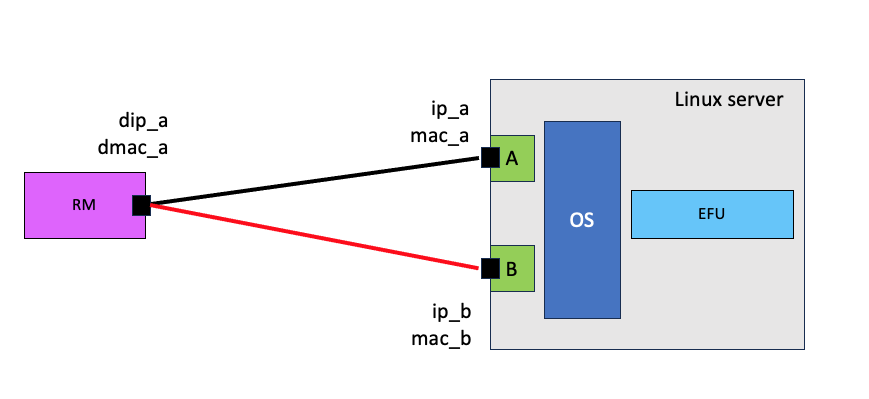
Ethernet connection between RM and EFU.
Debugging
To check/validate your configuration you can use tcpdump as shown in the figure below.
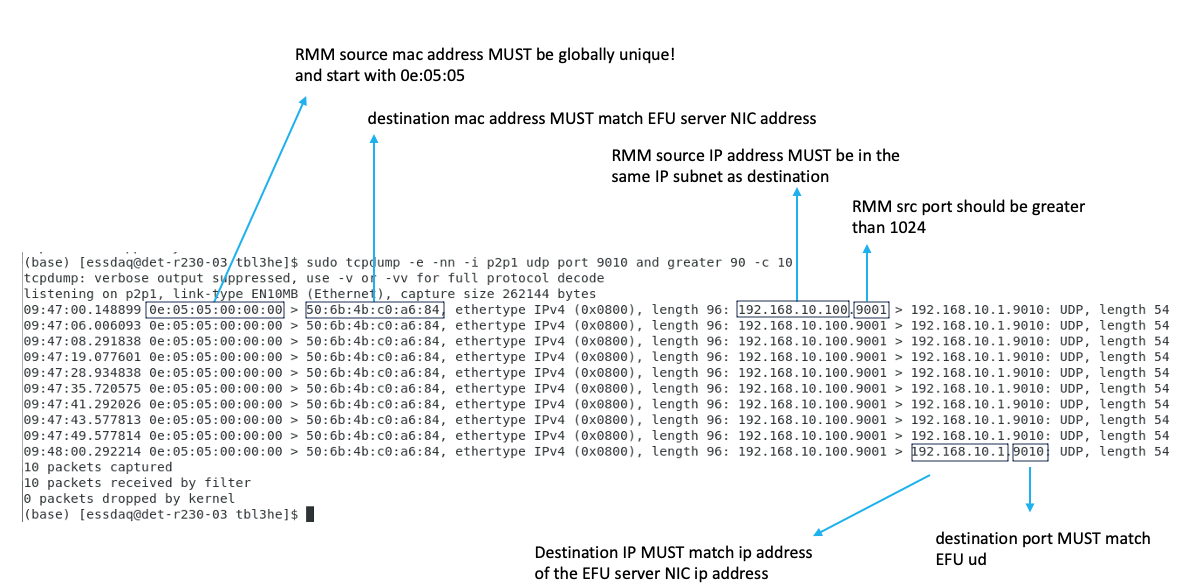
Using tcpdump to prepare/validate network parameters
The key point is the command
$ sudo tcpdump -i p2p1 -nn -e udp port 9010
which can be supplemented with further arguments. This command produces output similar to the figure above.
Direction of communication is shown by ‘>’. For example
$ 0e:05:05:00:00:00 > 50:6b:4b:c0:a6:84

Device with MAC address 0e:05:05:00:00:00 is sending to device with
MAC address 50:6b:4b:c0:a6:84
$ 192.168.10.100.9001 > 192.168.10.1.9010: UDP

Host with IP address 192.168.10.100 is sending (UDP) data to host with IP
address 192.168.10.1. (Data ids UDP, destination port is 9010